Tutorial 2 : More advanced usages
This turial presents the more advanced usage in deepvisiontools : - Using advanced configurations - Create custom dataset reader, preprocessings - Additional augmentations and custom ones - Create custom model wrappers - Create custom metrics - Play with inference with patchification parameters - Create custom data_type
Configuration() : all parameters
Here we just want to give you an overview of what Configuration() can already do for you. All this can be found in the documentation of Configuration()
device: Literal[“cpu”, “cuda”] = “cpu” Select the type of device to use. Note that deepvisiontools has not been developped for distribution over gpus nor multiprocessing with cpu.
data_type: Literal[“instance_mask”, “bbox”, “keypoint”, “semantic_mask”] = “bbox” This basically handle the task type
num_classes: int = 1 Simple enough : just change the number of target classes for all data_type
mask_min_size: int = 15 This is used both for semantic_mask and instance_mask : if a given mask has less than this pixel threshold it is simply removed
semantic_mask_logits_combination: Literal[“avg”, “min”, “max”] = “avg” This is use only for semantic segmentation. It’s the combination of logits method to be used. It’s called into the add method of the SemanticMaskFormat and is useful for patchification in particular. “avg” returns the average of logits and min and max are equaly explicits … Note that when we combine logits we do not combine them if one of them or both are 0. In that case the max is used (this is done to avoid mixing an empty black image prediction with an actual good image, in case of padding it can happen for exemple)
splitted_mask_handling: bool = False This is used for instance_mask : If set to true it can manage augmentations that split an object in multiple parts by creating a new object type for each par that is splitted ! It’s set to False by default as it can be quite disturbing to use (for exemple if you perform local transformation on images …)
model_nms_threshold: float = 0.45 Used only for bbox or instance_mask. This is the nms IoU threshold used in model post-processing. For exemple in som models you predict very large number of boxes and you need to remove the duplicates (typically by using an nms algorithm). It’s an hyper-parameter you can play with for your inferences.
model_confidence_threshold: float = 0.5 Used only for bbox or instance_mask. This simply remove objects for which the confidence score is below. You need to play with that to optimize your predictions.
model_max_detection: int = 300 Used only for bbox or instance_mask. This is the maximum number of predictions you will output from your model. It can be useful in case you generate a lots of predictions that are stored into your gpu device.
metrics_matcher_type: Literal[“bbox”, “instance_mask”] = “bbox” Used only for bbox or instance_mask. This is the object matched (based on iou) used in the metrics. bbox can be used for both bbox or instance_mask and will use the bounding box of the object (if instance mask it will calculate it). instance_mask will use the iou of the instance masks. For most cases they seem to lead to similar results, but it depends on your data.
metrics_match_iou_threshold: float = 0.45 Used only for bbox or instance_mask. Goes with the previous one : it’s simply the iou threshold used in metrics
patchifier_mode: Literal[“bbox”, “instance_mask”] = “bbox” Used only for bbox or instance_mask. It’s the way that the patchifier handle the objects post-processing suppression.
seed: Union[False, int] = False
deterministic: bool = False These last two are used for reproducibility. If set to True everything will be seeded. Note that some models cannot be deterministic, in that case an error will occur. But to get as close as possible to reproducibility you can anyway switch see to True.
Every parameters can be changed after initialisation of Configuration() by changing the attribute. Configuration() is a singleton design pattern, therefore every time it’s instantiated, it points to the first object you instantiated. Therefore you cannot change the attributes by instantiating it again.
[ ]:
from deepvisiontools import Configuration

config = Configuration(data_type="bbox", model_confidence_threshold=0.7)
print(config.model_confidence_threshold)
config.model_confidence_threshold = 0.9
print(Configuration().model_confidence_threshold)   # here you can see that the instantiation pointed to config as the default should be 0.5
/home/jbernigauds/miniconda3/envs/deepvisiontools_test/lib/python3.11/site-packages/tqdm/auto.py:21: TqdmWarning: IProgress not found. Please update jupyter and ipywidgets. See https://ipywidgets.readthedocs.io/en/stable/user_install.html
  from .autonotebook import tqdm as notebook_tqdm
0.7
0.9
Custom Datasets, preprocessings
As you probably noticed, DeepVisiondataset comes with default values that can be customized. In particular there are three that are worth to check in more details : - preprocessing - reader - category_ids
preprocessing is both an argument and an attribute of the class DeepVisionDataset. It can be changed dynamically as you may have seen in previous tutorials. By default preprocessing = bbuild_preprocessing(mean: List[float] = [0.485, 0.456, 0.406], std: List[float] = [0.229, 0.224, 0.225]) -> T.Compose. This will normalize your images according to imagenet dataset standards. The default preprocessing is often more than enough, in particular if you use pre-trained models. You can of course change the imagenet default values by calling deepvisiontools.preprocessing.image.build_preprocessing with the convenient args, but you can also implement you personalized preprocessing : for exemple Yolo preprocessing are simply dividing image by 255 :
[ ]:
from deepvisiontools import DeepVisionDataset

def yolo_processing(image):
    return image // 255

my_dataset = DeepVisionDataset("mydataset/path", preprocessing=yolo_processing)
The reader is a more advanced feature : it allows you to create data readers that are compatible with you data format (if you use csv or whatever other format to store your annotations, or any folder structure for your data). Do do so, we recommend that you use the Abstract class BaseReaderClass of deepvisiontools that will drive you along the way of implementation. Note that you will need to perform concrete implementation of different methods. For exemple we provide below the source code of SemanticReader which is the default data reader presented in Tutorial 1.
[ ]:
from deepvisiontools.data.data_reader import BaseReader
from typing import Union, Dict
from pathlib import Path
from deepvisiontools.formats import (
    SemanticMaskFormat,
)
from deepvisiontools.formats.base_data import (
    SemanticMaskData,
)
from deepvisiontools import Configuration

from deepvisiontools.preprocessing import load_mask

DEFAULT_SEMANTIC_ANNOT_PATH = "masks"
SUPPORTED_IMAGE_EXTENSIONS = [
    "png",
    "PNG",
    "jpg",
    "JPG",
    "jpeg",
    "JPEG",
    "tif",
    "TIF",
    "tiff",
    "TIFF",
]


class SemanticReader(BaseReader):

    annotation_file_type = "tiff"  # used for export dataset only

    def __init__(self, dataset_path: Union[str, Path]):
        dataset_path = (
            dataset_path if isinstance(dataset_path, Path) else Path(dataset_path)
        )
        # load all files paths (images and masks)
        self.masks_path = dataset_path / DEFAULT_SEMANTIC_ANNOT_PATH
        images_path = dataset_path / "images"
        self.images_path = images_path
        self.images = list(images_path.glob("*"))
        self.images = [
            f.name for f in self.images if f.suffix[1:] in SUPPORTED_IMAGE_EXTENSIONS
        ]
        self.images = sorted(self.images)
        self.masks = list(self.masks_path.glob("*"))
        self.masks = [
            f for f in self.masks if f.suffix[1:] in SUPPORTED_IMAGE_EXTENSIONS
        ]
        self.masks = sorted(self.masks)
        assert len(self.masks) == len(
            self.images
        ), "Not same number of masks and images. You must have the same."
        self.category_ids = {
            i + 1: str(i + 1) for i in range(Configuration().num_classes)
        }

    @property   # this property must be implemented even if trivial
    def category_ids(self):
        return self._category_ids

    @category_ids.setter
    def category_ids(self, val: Dict[int, str]):
        self._category_ids = val

    def __getitem__(self, index):   # this must be implemented, it is the heart of a data reader and should return image and target
        img_name = self.images[index]
        assert (
            Path(img_name).stem == self.masks[index].stem
        ), f"In Reader: index {index} leads to different name for image and mask, got {img_name} and {self.masks[index].name}"
        target = load_mask(self.masks[index])
        target = SemanticMaskData(target)
        target = SemanticMaskFormat(target)
        return img_name, target

    def __len__(self):  # this is important to obtain the len of dataset
        return len(self.images)

    def export_annotation(      # This must be implemented, but if you don't plan to export the datasets just return None and it should work. However if you want to be able to export your dataset you need to complete it
        self, image_name, image, annotation: SemanticMaskFormat, cats
    ):
        assert isinstance(
            annotation, SemanticMaskFormat
        ), "In semanticreader : annotation must be SemanticMaskFormat"
        mask = annotation.data.value
        mask = mask.to("cpu")
        return image_name, mask

    def group_export(   # similar as previous one
        self,
        sub_anns_dir: Union[str, Path],
        destination: Union[str, Path],
        categories: Dict[int, str] = None,
    ):
        destination = "masks"
        sub_anns_dir.rename(sub_anns_dir.parent / destination)
Disclaimer : DeepVisionDataset should support anything correctly implemented with the exception of the export function … You might need in addition to modify this method in DeepVisionDataset.
Finally, there is an easy attribute you can modify : the category correspondance between class name and label. This is simply done using a dictionnary. It’s worth mentionning when considering the exportation of datasets : it will use either class labels or apply the equivalence dictionnary on them for the visualizations created during the export. You can find an exemple of this in Tutorial 1 about semantic segmentation.
Additional augmentations and custom ones
We are going distinguish 2 types of augmentations : - Normal augmentations (are applied when the image is loaded into the Dataset) - Batch augmentations : are applied into Data Loaders in order to mix up the batchs (like create batchs mosaics for exemple)
Normal augmentations
Augmentations within deepvisiontools are based on the different data formats (BboxFormat, InstanceMaskFormat and SemanticMaskFormat). We took advantage of powerful tv_tensors and torchvision.transforms.v2. A quick explanation : a deepvisiontools format has a data attribute which lead to a BaseData object, and the tensor value is accessed via its value attribute.
Therefore you can access the value with
[2]:
from deepvisiontools.formats import BboxFormat

box = BboxFormat.empty((10, 10))
print(box.data.value)
BoundingBoxes([], size=(0, 4), format=BoundingBoxFormat.XYXY, canvas_size=(10, 10))
As you can see the tensor value is actually a tv_tensor (inherits from torch.Tensor). Torchvision uses these to implement hooks in their augmentations (transforms). deepvisiontools therefore uses torchvision transforms v2 augmentations and it works like a charm.
Now that this is clear, it seems natural to consider creating custom Augmentations by inheriting from torchvision Transform class.
Here is an example that is already implemented in deepvisiontools.data.additional_augmentations
[ ]:
import torch
import torchvision.transforms.v2 as T
from torchvision.transforms.v2 import Transform
from typing import Sequence


class RandomCenterCropAndResize(Transform):
    """
    With a given probability, apply CenterCrop and Resize from torchvision.transforms.v2.
    NB : here we resize only and systematically if cropped.

        Args:
            crop (``Union[int, Sequence[int]]``): Size to crop
            resize (``Union[int, Sequence[int]]``): Size to resize
            p (``float``, **optional**): probability. Defaults to 0.5.
    """

    def __init__(self, crop: Sequence[int], resize: Sequence[int], p=0.5, **kwargs):
        super().__init__(**kwargs)
        self.p = p
        self.crop = T.CenterCrop(crop)
        self.resize = T.Resize(resize)

    def forward(self, *inputs):
        if torch.rand(1) >= self.p:
            pass
        else:
            inputs = self.crop.forward(inputs)
            inputs = self.resize.forward(inputs)
        return inputs
This very simple augmentation (crop an image at center and resize it - produce a zoom in effect) is not available in torchvision. But implementing it is straightfoward : you need to inherit from Transform and implement the forward method. The key idea is to mostly use already existing base augmentations (in the exemple we use Resize and CenterCrop).
Indeed : if you want something completely new, you will need to implement specific tv_tensors hooks. If you really need it please have a look at torchvision documentation on creating Custom Transforms and tv_tensors
Another additional augmentation available in deepvisiontools is worth mentioning : RandomChangeBackground. This augmentation takes as an argument a directory that contains images. These images will be used to change the background of one image of your train set. For exemple for semantic segmentation, the part of the image that contains targets class will be extracted and pasted on a new image. For instance masks it’s the same. And for BoundingBoxes it will slice the bbox from the image and plug it into the new one.
Batch augmentations
Sometimes, we would like to include augmentations at the batch level : a typical exemple is the mosaic augmentation : for exemple you will have 4 imgs in your batch and you want to slice all of them in 4 and combine them in 4 differents ways. This type of augmentation can be implemented in deepvisiontools.
You need to implement a concrete class that inherits from AbstractBatchAugmenter. As you can see below, the only need is to implement the concrete get_new_batch method.
class AbstractBatchAugmenter(ABC):
    """Abstract class for augmentation within DataLoader (combine elements of batch together such as mosaic type augmentation)
    Note : these augmentations always come after normal augmentations that are implemented in Dataset instead of dataloader for this one.
    """

    @abstractmethod
    def get_new_batch(
        self, images_batch: Tensor, targets_batch: BatchedFormat
    ) -> Tuple[Tensor, BatchedFormat]:
        pass
One is already implemented : MosaicBatchAugmenter.
To use it, one simply needs to include it into the DeepVisionLoader class
[ ]:
from deepvisiontools import DeepVisionDataset, DeepVisionLoader
from deepvisiontools.data.batch_augmentations import MosaicBatchAugmenter

my_dataset = DeepVisionDataset("mydataset")

my_loader = DeepVisionLoader(my_dataset, batch_size = 6, batch_augmenter=MosaicBatchAugmenter(4, 0.1))
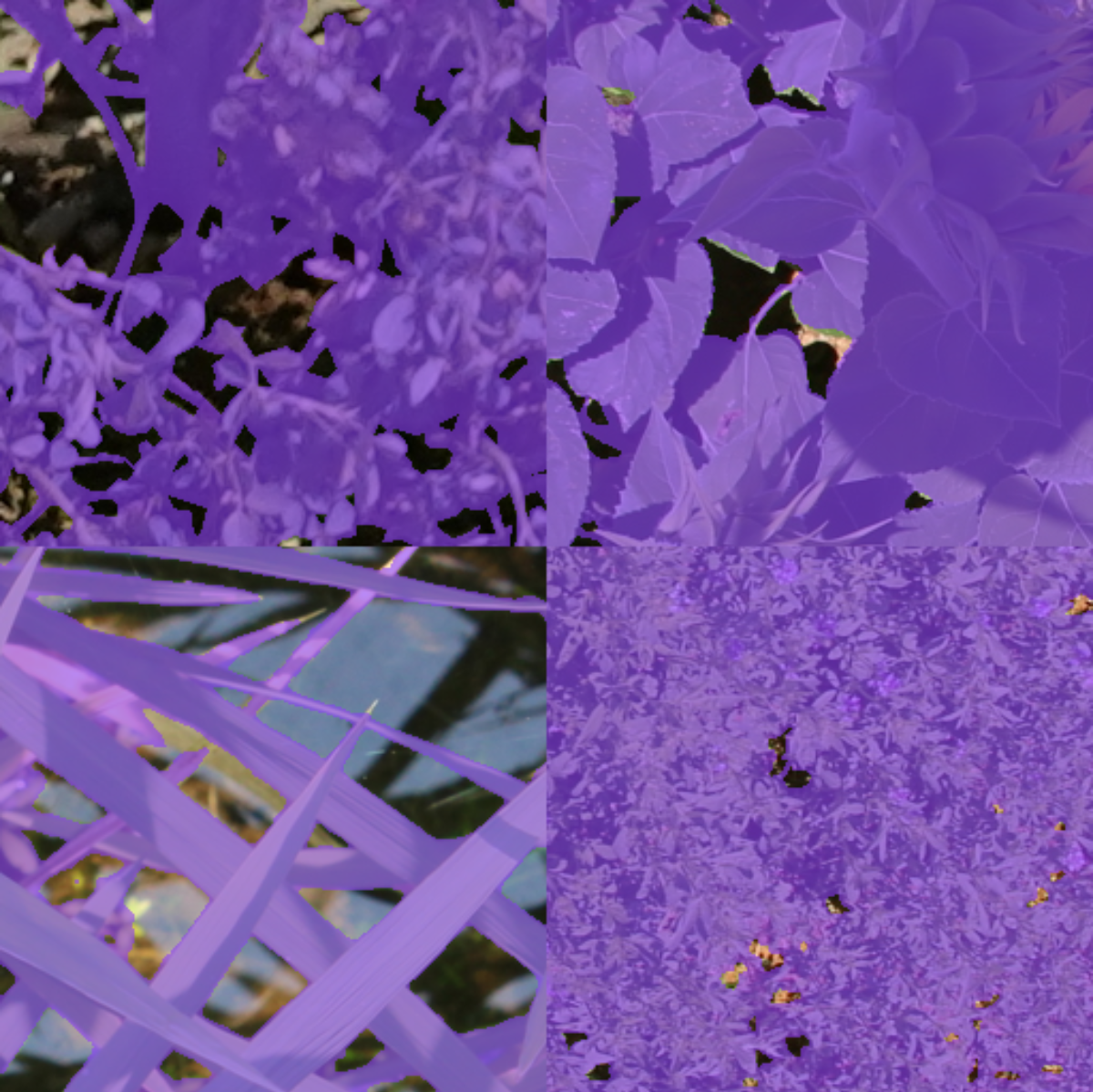
Note that DeepVisionLoader has a visualize method to create visualizations for batches. It’s particularly useful to check the actual batch augmentations.
Create custom models wrappers
We come now to a central point of deepvisiontools : the integration of specific models. Deepvisiontools aims at providing built-in models for its users, however we do not aim at developping our own models … Instead we propose an interface that wraps existing models and make them compatible with deepvisiontools machinery : formats, training, metrics, inference.
To integrate your models in deepvisiontools here are the generic steps : - Be sure that an adequate format exists. For exemple, detectools does not handles keypoints at the moment. If you wish to have a keypoint model, you first need to create a specific format (this will be discussed at the end of this tutorial). - You need to write a correct data reader to be compatible with DeepVisionDataset - You can implement your Wrapper : to guide you, you should inherit from BaseModel class and implement all the abstract methods - Make sure that if you use a new format, you have correctly implemented a specific metric Matcher and adapted some metrics to it.
As you can see, it is not a straightforward process. While possible, and not so complicated in theory, you may as well encounter bugs that were not anticipated for.
We suggest that you cantact one of the authors or put an upgrade request on the gitlab of deepvisiontools.
Please have a look at the already implemented models to get an intuition on how to do it.
Create custom metrics
Custom metrics are easier to create than models. To get an idea on how it works : - available metrics in detectools are all derived from BaseMetric type class (DetectMetric, SemanticMetric, ClassifMetric etc.). All of them inherits from torchmetrics Metric class. - The way they work : they aggregate true positives, false positive, true negatives, false negatives along the epoch. To compute the metric they use specific functions that will combine the TP, FP, TN, FN into the actual metric - To obtain TP, FP, FN for detection metrics, you need to use a matcher (that is already implemented for instance_mask and bbox).
Therefor you can face 2 cases : The easy one and the trickier one.
For the easy it’s simple : you want to create a metric based on TP, FP, TN, FN for an object already implemented (bbox, semantic_mask, instance_mask). In that case you can simply inherit from a BaseMetric of deepvisiontools and feed it a custom TP, FP, TN, FN function. For exemple in the case of F1score for detection :
class DetectF1score(DetectMetric):
    """F1 score for detection task."""

    def __init__(self, *args, **kwargs):
        super().__init__(func=F.f1score, name="DetectF1score", *args, **kwargs)
where F.f1score is
def f1score(tp, fp, tn, fn):
    return (2 * tp) / (2 * tp + fp + fn)
The trickier case is when you have a completely new type of metric (like meanAP for exemple) or for a new object.
In that case we suggest that you cantact one of the authors or put an upgrade request on the gitlab of deepvisiontools. You can also have a look at the source code for insights.
Inference and patchification
Inference is a key item in computer vision, it’s the final step of all your project when you can finally get your model to predict stuff. But weirdly, it’s not as studied or least not as easy to get refernces on how to do it optimally. It’s particularly true for cases where you train a model on patches while you want to predict on very large images. While for semantic segmentation tasks patchification usually works very well (by combining logits properly) it’s much harder on detection tasks. Some models, such as Yolo, are already adapted to this difficulty but many models are not.
In deepvisiontools we provide a Predictor class that can handle Patchification for detection and segmentation tasks. For segmentation it works pretty well but for detection you might need to finetune the postprocessing to attain optimal performances. However default parameters should be rather adapted for most cases.
Let’s first see how Predictor works
[ ]:
from deepvisiontools import Predictor

predictor = Predictor(
    "mymodel.pth",
    preprocessing=mypreprocessingfunc,
    patch_size=(512, 512),
    overlap=0.4,
    border_padding=100,
    categories=my_cat_dict_for_visu,
    patchifier=MyPatchifier
)

img = "my/img/path"

predictor.predict(img, visu_path="visu.png")
The Predictor class comes with many arguments/attributes. Most of them have a default value but let’s comment on some of them : - preprocessing : the default preprocessing is the same as the default preprocessing in dataset, i.e imagenet normalization. If you used a custom one during training, don’t forget to change it here … - patch_size : can be None or Tuple. If None will run forward on the full image. If Tuple is equal to img size then same as None. But if Tuple is different it will padd the image and create n patches that are derived from the image size and the overlap (patch overlapping linear fraction) attribute. The patches will then later be aggregated according to the specific Patchifier provided. - patchifier : By default the patchifier/unpatchifier is either the DetectPatchifier or the SemanticPatchifier, but you can create a custom one by inheritating from the BasePatchifier class.
The semantic patchifier is quite straightforward, the detect one is where you might need a bit of fine tuning.
You can provide to the predictor the DetectPatchifier where you specify some particular arguments values
[ ]:
from deepvisiontools import Predictor
from deepvisiontools.inference import DetectPatchifier

patchifier = DetectPatchifier(
    patch_size=(512, 512),
    overlap=0.4,
    border_penalty=0.5,
    nms_iou_threshold=0.45,
    final_score_threshold=0.4,
)
Let’s be a bit more specific on these arguments.
border_penalty : this will apply a decreased confidence score value depending on how far from the center an object is. Indeed the more you get on the hedge, the less you have context to take a decision. This can be particularly helpful in particular for unpatchification with overlap ! When you need to discriminate duplicated objects originating from different patches.
nms_iou_threshold : this is the value used in the nms algorith that will be used to remove duplicate objects.
final_score_threshold : it will be used as a final object removal after the border penalty. This might help the suppression of duplicated objects that remain or diminish the number of false positive in the detection.
Custom data_type
While possible, the creation of new formats in deepvisiontools is neither simple or straightforward. We tried to provide a global structure to host custom data type but we can’t anticipate everything. Therefore you may encounter numerous bugs, and it takes time to implement such formats.
However this is a guideline :
Create BaseData class : a format takes as data a BaseData object. You can find SemanticBaseData, BboxBaseData or InstanceMaskBaseData classes in deepvisiontools.formats.base_data
Second Create a BaseFormat for this BaseData : this will handle all operation at the format level (including label etc.)
Implement the actual format : this is super easy as you only need to implement a couple of method. Check deepvisiontools.formats.formats for exemple
Implement adapted dataset reader
Adapt Visualizer class to display your data. Take exemple on how it’s done for already present data types
Implement a usable model
Adapt metrics or create new ones that are compatible
Adapt Predictor/patchifier class
Anyway we suggest that you cantact one of the authors or put an upgrade request on the gitlab of deepvisiontools.